Tutorial: Create or Edit a Grade Curriculum
Setting what a whole grade is taught and how often, then pushing it down to every class in that grade in one action.
Last updated Sat Sep 26
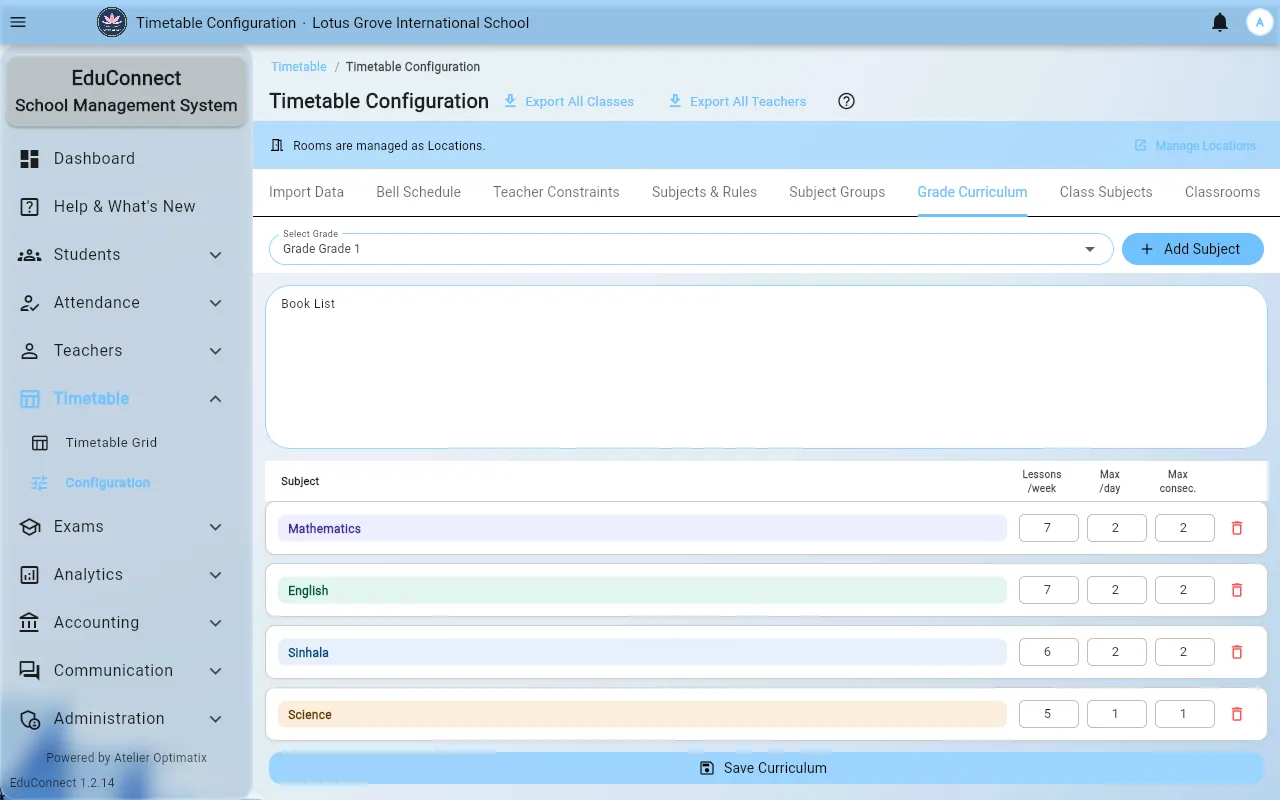
The grade curriculum is the template: "every Grade 8 class is taught these subjects, this many times a week." You write it once per grade, then apply it to all that grade's classes rather than assigning subjects class by class.
You need: access to Timetable → Configuration, and classes that already have the right grade set on them — see Add a Class.
Steps
Open Timetable → Configuration and select the Grade Curriculum tab.
Pick the grade under Select Grade.
For each subject the grade is taught, select Add Subject and fill in:
- Subject — searchable; the list comes from Timetable → Configuration → Subjects & Rules.
- Lessons / week — how many periods a week this subject gets. This is the number the generator tries to place.
- Max per day — the ceiling on any single day. Leave blank to accept the default.
- Max consecutive — how many may run back to back. Leave blank to accept the default.
Blank is not zero. Blank means "use the default"; the row shows an (override) marker only where you have set something explicitly.
Optionally fill in the Book List — a free-text list of the grade's books, kept alongside the curriculum.
Select Save Curriculum. This saves the curriculum and pushes it to every class in the grade: the confirmation names how many classes will receive it and reminds you that existing teacher assignments will not be changed. Select Save & Apply, and the result tells you how many class-subject entries were created and how many updated.
Because it never touches teacher assignments, saving again after a curriculum change is safe — it adds and adjusts subjects without unpicking who teaches what.
Editing an existing curriculum
Change the numbers in place and Save Curriculum again. Removing a subject from the curriculum does not retroactively strip it from classes that already have it; remove it in Class Subjects if you need it gone.
What to do next
Assign teachers to those subjects, then generate the timetable.