Teachers: Your Timetable
Reading your own week, what the SUB marker means, and why you can see it but not change it.
Last updated Sat Sep 26
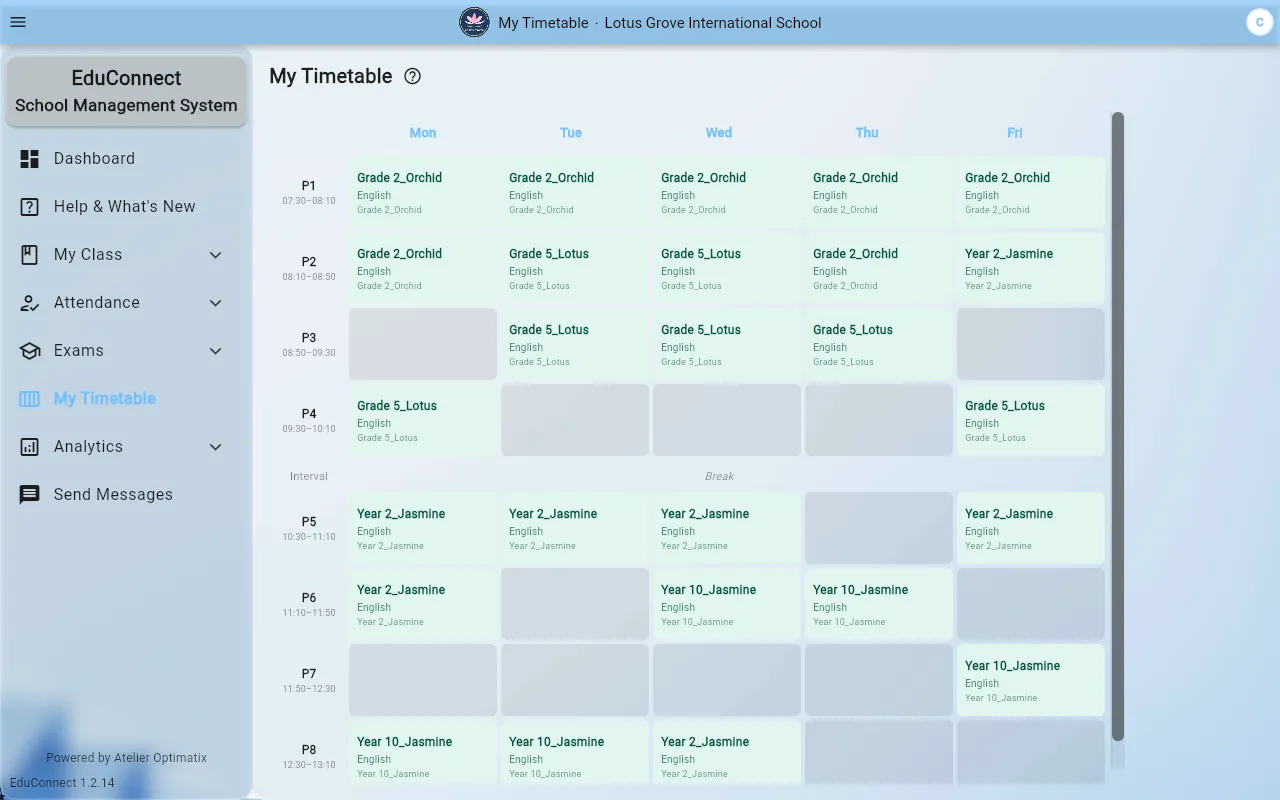
My Timetable is your own week, one tab per day. It is read-only by design — the timetable is built centrally so that one person's change cannot double-book someone else. See Generate the Timetable for how it is produced.
Reading it
Each day tab lists your periods in order with the class, the subject and the room. Free periods and breaks are part of the day, drawn from the bell schedule your institute uses.
The SUB marker
A period flagged SUB is one you are covering for an absent colleague. It is not part of your normal timetable and it will not be there tomorrow — it comes from the day's substitution plan.
Two things follow from that:
- Check My Timetable in the morning, not just at the start of term. A substitution added today appears today.
- A SUB period is somebody else's class. You are covering it, not taking it over, and it disappears from your week when the plan for that day does.
If you think a SUB assignment is wrong, it is changed in the substitution plan by whoever built it — see Substitution Duties.
If your timetable is empty
Either the timetable has not been generated yet for this term, or the subjects you teach are not assigned to you against any class. The second is the more common one, and it is fixed in Timetable → Configuration → Class Subjects by an administrator — see Assign Subjects and Teachers to a Class.
Related