EduConnect Advanced workflows admin staff
Plan Cover for Absent Teachers
The morning routine — finding today's gaps, choosing substitutes, saving the plan so it reaches teachers, and handling mid-day departures.
Last updated Sat Sep 05
This is a daily routine, not a configuration task. It has to happen early — the plan does not reach anyone's timetable until it is saved.
You need: access to Teachers → Substitution, and today's teacher attendance recorded.
The morning routine
- Check who's absent. The Teachers dashboard shows Present Today and Absent Today at a glance, with Arrange Substitutes leading straight to the plan. If it says All teachers are present! there is nothing to do.
- Open Teachers → Substitution.
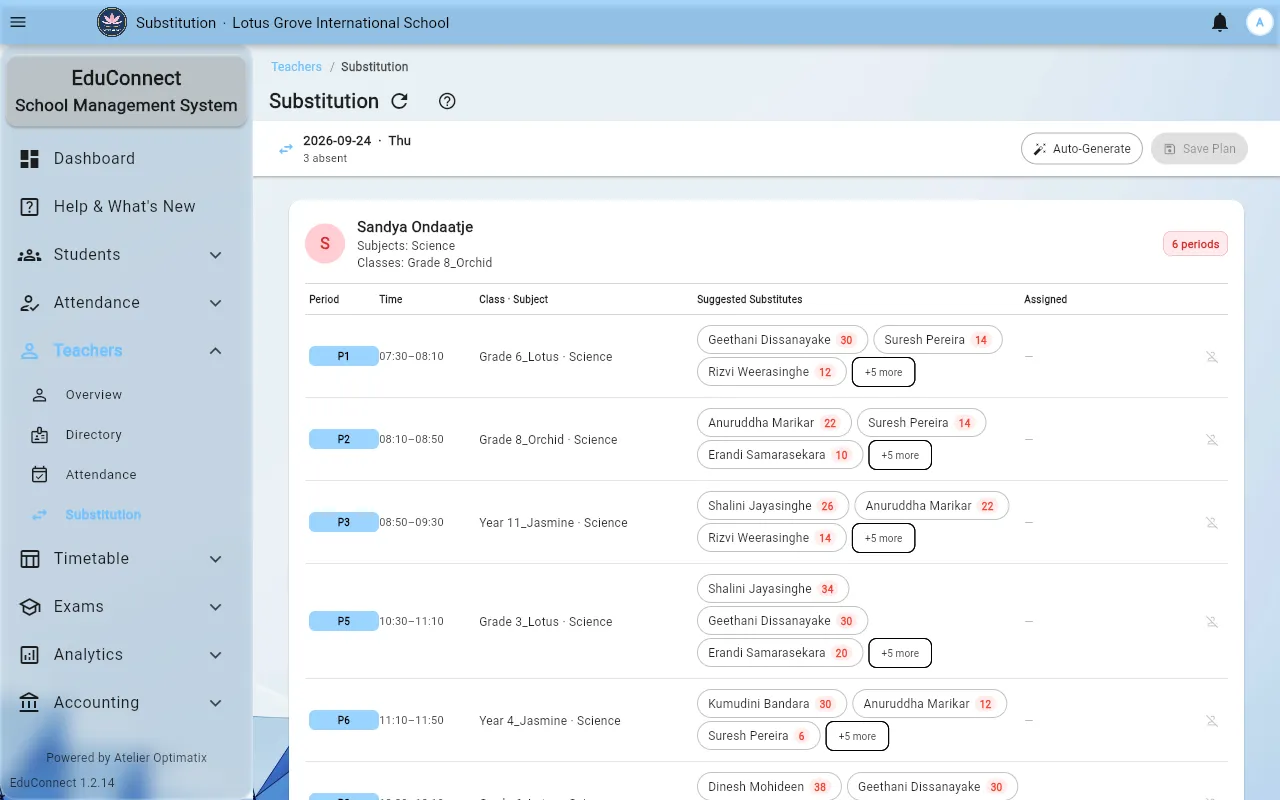
- The screen lists every period needing cover: Period, Time, Class · Subject, and Suggested Substitutes. Rows for a teacher who turns out to be in show Teacher present — no sub needed.
- For each row, pick a substitute:
- Suggested Substitutes are teachers who are free that period and teach that subject. Prefer these.
- Any teacher widens it to everyone free, when no subject match exists. Supervision rather than teaching, but better than an unattended class.
- No suggested substitutes means nobody is both free and qualified. Widen the search, or accept the gap deliberately.
- Use Remove from plan to undo an assignment before saving.
- Save the plan. The status reads Plan ready to save until you do, then Plan saved.
Nothing reaches any teacher until you save. A plan built and left unsaved is invisible.
Getting it to people
- Saving puts a SUB marker on each substitute's My Timetable, for that day.
- Print Plan produces the staffroom copy.
Do both. Teachers who don't check the app in the morning are exactly the ones you need to reach.
Mid-day departures
When someone leaves partway through the day, use Add teacher's periods (early departure):
- Select the teacher and the periods from their departure onward.
- Add Periods puts those periods into today's plan as gaps.
- Assign substitutes and save again.
Their morning periods, already taught, are left alone.
Status messages
| Status | What it means |
|---|---|
| Weekend — no timetable | Nothing is scheduled today |
| All teachers present today | No absences recorded |
| No substitutions needed | Absences exist, but none of them had periods today |
| Plan not created | There are gaps and nobody has started |
| Plan ready to save | Assignments made, not yet saved — not live |
| Plan saved | Live on teachers' timetables |
Related
- Teacher Attendance & Substitution
- Substitution Duties — the teacher's side