Tutorial: Set Up Fees
Defining what your institute charges, when it falls due, and which classes it applies to — before any payment can be recorded.
Last updated Sat Sep 05
Nothing in Accounting works until fees exist. A payment is always against a charge, and charges come from the fee schedule you define here.
You need: access to Accounting → Fee Setup.
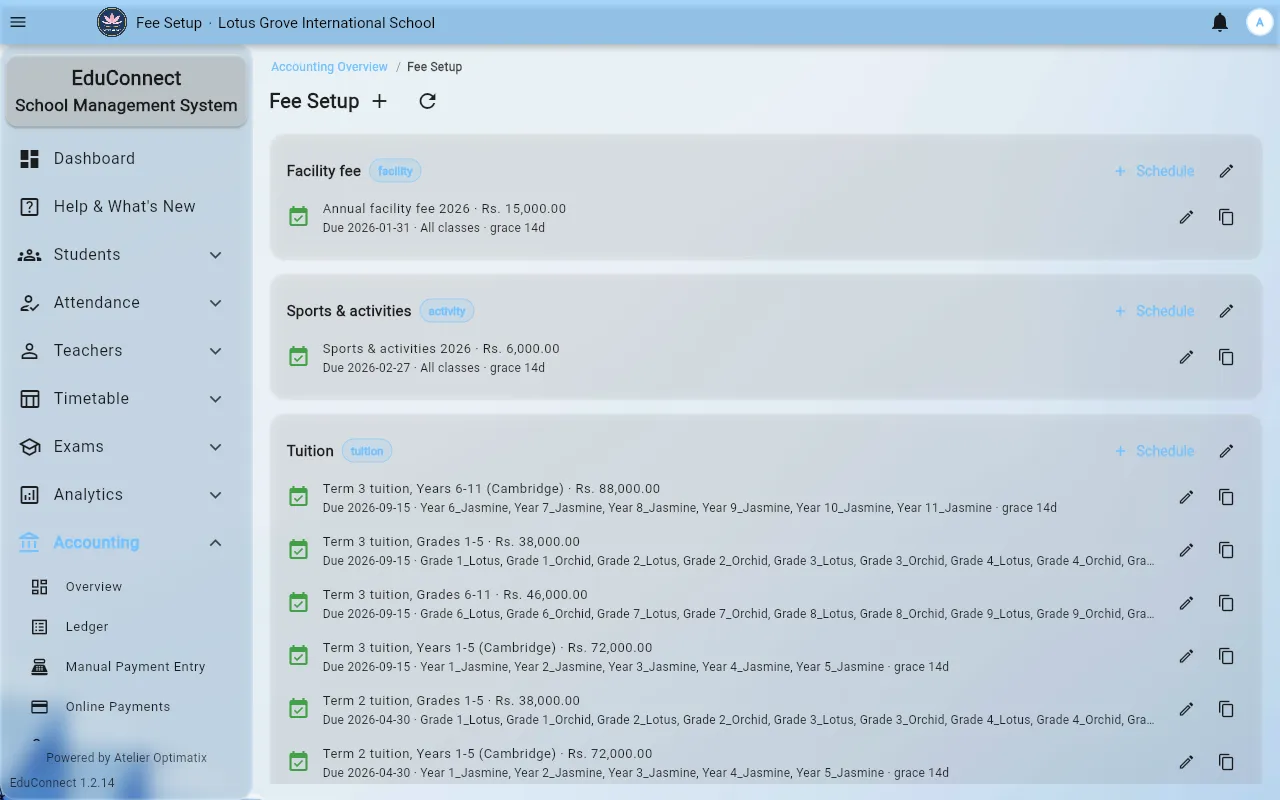
The two levels
- A fee type is the thing being charged — Term Fee, Admission Fee, Transport.
- A schedule is one instalment of it: a label, an amount, a due date, and who it applies to.
One fee type usually has several schedules — three termly instalments of the same Term Fee.
Steps
- Open Accounting → Fee Setup.
- Create or select the fee type.
- Select Schedule to add an instalment, and fill in:
- Label — what appears on the parent's statement and the receipt. Be specific:
Term 1 2026, notInstalment. - Amount.
- Due date — what makes a charge overdue, and what payment reminders key off.
- Applies to classes — either All classes, or tick the specific ones. This is how you charge different amounts to different year groups: one schedule per set of classes.
- Active — leave on. Turning it off retires a schedule without deleting its history.
- Label — what appears on the parent's statement and the receipt. Be specific:
- Save.
Duplicating
Duplicate copies an existing schedule so you can change just the label, amount and due date. This is the fastest way to roll a fee forward to the next term or year, and it keeps the wording consistent between instalments.
Retire rather than delete
Switch Active off for a schedule that no longer applies. Deleting one that already has payments against it is what produces the orphaned charges you then have to clear in Reconciliation.
What to do next
- Record payments as they come in.
- Set up discounts for scholarships and sibling reductions.
- Decide what unpaid fees do to portal access in Accounting → Portal Access Rules.
Related